
Printable Instrument Tuning Chart
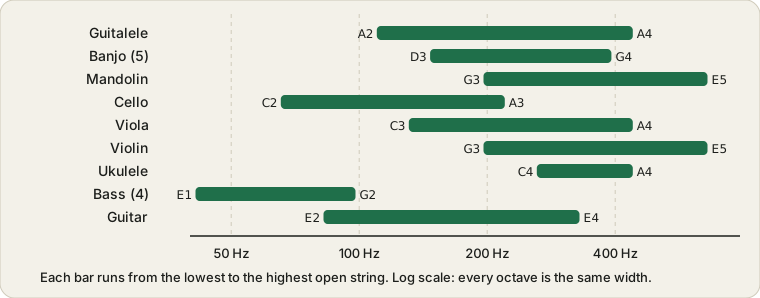
Standard open-string notes and frequencies for nine instruments on one printable page, with links to the tuner for each.
Last updated:
Standard tuning frequencies
Tap any note to hear it.
| Instrument | String | String | String | String | String | String |
|---|---|---|---|---|---|---|
| Guitar (6-string) | E2 82.41 | A2 110.00 | D3 146.83 | G3 196.00 | B3 246.94 | E4 329.63 |
| Bass guitar (4-string) | E1 41.20 | A1 55.00 | D2 73.42 | G2 98.00 | ||
| Ukulele (soprano, standard) | G4 392.00 | C4 261.63 | E4 329.63 | A4 440.00 | ||
| Violin | G3 196.00 | D4 293.66 | A4 440.00 | E5 659.26 | ||
| Viola | C3 130.81 | G3 196.00 | D4 293.66 | A4 440.00 | ||
| Cello | C2 65.41 | G2 98.00 | D3 146.83 | A3 220.00 | ||
| Mandolin | G3 196.00 | D4 293.66 | A4 440.00 | E5 659.26 | ||
| Banjo (5-string, open G) | D3 146.83 | G3 196.00 | B3 246.94 | D4 293.66 | G4 392.00 | |
| Guitalele | A2 110.00 | D3 146.83 | G3 196.00 | C4 261.63 | E4 329.63 | A4 440.00 |
Strings are listed from the lowest to the highest in pitch, except the ukulele (re-entrant, so the G string is higher than C) and the 5-string banjo (its short fifth string is the highest). Frequencies are in hertz, rounded to two decimals. They start at A4 = 440 Hz and change if you pick another reference above.
Tap a note to hear it
Every note in the chart is a button. Tap E2 in the guitar row and you get a three-second reference tone at 82.41 Hz. Press Play all at the start of a row and the open strings sound one after another, in the order the row lists them. It's handy for tuning by ear when you have no mic, or for checking you've picked the right target before you start turning pegs.
The reference selector changes A4 and recalculates every frequency in the table. 440 Hz is the default and what nearly every tuner assumes. 442 Hz turns up in some orchestras, and 415 Hz is the usual pitch for Baroque groups on period instruments, about a semitone lower. Whatever the people you play with are tuned to is the right setting.
One limit: the tones come out of your device's speaker as a plain synthetic note. Small phone speakers barely reproduce the lowest notes, so you may hear almost nothing from bass E1 (41 Hz) even though it's playing. Headphones help. Or use the tuner for that instrument, which listens to your string instead of playing one.
How to use this chart
Pick your instrument, then tune each open string to the note and frequency shown. Open the matching tuner to see how far off you are in cents: Guitar, Bass, Ukulele, Violin, Viola, Cello, Mandolin, Banjo or Guitalele. For any other instrument, the Chromatic Tuner shows the nearest note.
Use the printed chart as a quick reference on a music stand. For tunings other than the standard ones shown here, see alternate guitar tunings.
Note names and A4 = 440 Hz
Note names include an octave number, so E2 and E4 are the same letter two octaves apart. Concert pitch sets A4 to 440 Hz, and every other frequency in the chart follows from it. Some groups tune to a different reference, such as A4 = 415 Hz for Baroque music, which lowers every note by about a half step.
Frequently asked questions
How do I hear the notes on the tuning chart?
Tap any note in the table and it plays a three-second reference tone at that frequency. The Play all button at the start of each row sounds that instrument's open strings one after another, in the order shown. The tones are synthetic and play through your device speaker or headphones.
What does changing the A4 reference pitch do?
It recalculates every frequency in the chart from the new A4. 440 Hz is the standard. Some orchestras use 442 Hz, and Baroque groups often use 415 Hz, which sits about a semitone lower. Use whatever the rest of your group is tuned to.