
On this page
- What a water eject sound does
- Muffled speaker after rain
- How to use the speaker cleaner
- Which mode to use
- What it cannot fix
- Why a low sound moves water
- Dust and debris in a speaker
- Drying a wet device properly
- Where the idea came from
- Frequently asked questions
- Fixing common problems
- More tools on ProDeviceTest
What a water eject sound does
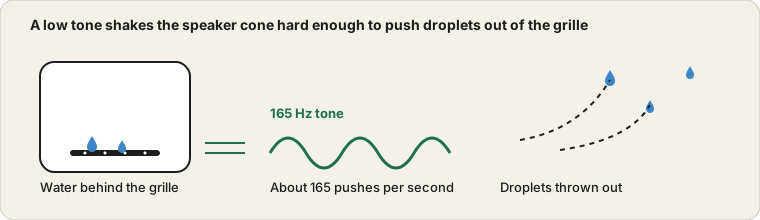
A speaker is a thin cone that moves back and forth to push air. When a droplet is sitting in the grille or in the small channel behind it, the droplet clings to the surface, dampens the cone and blocks the air path. The result is the sound everyone knows: a call that goes quiet and dull, music that sounds like it is playing under a blanket.
Playing a low tone loudly makes the cone swing a long way, over and over. Each swing gives the droplet a small shove. After a few seconds of that, a good share of the water that was only loosely held tends to move toward the opening and fall out. That is the whole idea, and it is the same one smartwatches use when they offer to clear water after a swim.
This page adds three things around the tone: timed rounds with a gap to wipe the grille, a choice between a steady tone, a glide and short bursts, and a clarity check so you can hear whether any of it made a difference instead of guessing. The check works by ear, because a web page has no way to see inside your device.
Muffled speaker after rain: three rounds of water eject
Say a phone has been in a wet coat pocket and the speaker now sounds like it is behind a pillow. You press Play clarity check before doing anything and rate it Muffled. Then you pick Water eject, three rounds of 20 seconds, wave on sine, volume at 80 percent, and press Start.
The page counts the rounds for you ("Round 1 of 3 · 20 s left"), then a four-second pause where it tells you to wipe the grille. At 165 Hz, one 20-second round is 3,300 pushes of the cone (165 times 20), so three rounds make 9,900. After round one you run the check again and it sounds a bit less dull, so you choose A bit better. After round three it sounds normal and you choose Clear. The log under the check then reads: Before cleaning, Muffled; After 1 round, A bit better; After 3 rounds, Clear.
Now the case that is not water. Suppose the tone crackles and buzzes from the first second, even at a low page volume, and the check sounds just as rough. Running more rounds will not help, because crackle at any volume usually points at a damaged cone or a loose part, not a droplet. In that case stop, and use the Sound Test to see whether left and right both work.
How to use the speaker cleaner
- Put the device in a good position
Switch off any silent or vibrate mode, set the device volume to about three quarters or full, and disconnect headphones and Bluetooth. Lay the device speaker side down on a dry cloth or a tissue so droplets have somewhere to land.
- Choose a mode and the number of rounds
Water eject at 165 Hz is the default. Three rounds of 20 seconds is a good first try. The page leaves a few seconds between rounds so you can wipe the grille.
- Run the clarity check first
Press the clarity check, listen to the short tones and rate how they sound. That gives you a before to compare with.
- Press Start and keep clear of the speaker
The tone is low and fairly loud for a small speaker. Keep the device away from your ear and stop at once if it rattles or crackles.
- Wipe, tilt and check again
After each round, wipe the grille with a dry cloth, tilt the device with the speaker facing down and run the clarity check again. Stop when it sounds clear or when five rounds have changed nothing.
If you are working with a phone that went through a proper soaking, switch it off first and dry the outside, then come back to this page once it has been off for a while. The same goes for a watch or earbuds: sound is a finishing step, not a rescue.
Which mode to use
| Mode | What it plays | Best for |
|---|---|---|
| Water eject | A steady 165 Hz tone | The first try for any water in the grille. It is gentle and easy to hear when it stops |
| Deep sweep | A glide from 100 up to 400 Hz, repeated every six seconds | When the steady tone gave a small improvement and then stalled. Different droplet sizes react to different pitches |
| Pulse | 200 Hz in half-second bursts | Crumbs, fluff and grit on the mesh, where short sharp shakes work better than a long tone |
Square wave is there for the stubborn cases. It carries more energy than sine at the same setting, which also means more distortion and more strain on a small speaker. Start on sine and only switch if three rounds changed nothing.
What it cannot fix
Be realistic about this. A tone can move water that is sitting in the speaker opening. It cannot reach inside the device, it cannot dry the battery or the board, and it cannot undo corrosion. If a phone was dropped in a pool or in the sea, a muffled speaker is the least of your worries, and the right move is to switch it off and not charge it.
It also does nothing for the charging port. The port has no speaker, so there is nothing to vibrate. If your phone shows a moisture warning there, wait for it to dry before plugging anything in, as the warning says.
And it will not fix a speaker that was already weak. If the clarity check sounds the same before the water and after it, the problem was never the water. Check the speaker with the Tone Generator to find where it fades out.
Why a low sound moves water
Frequency is how many times per second the cone moves. At low frequencies it moves a long way on each swing, because it has more time to travel before turning back. At high frequencies it just trembles. A long swing is what you need to dislodge a droplet, which is why the tones here sit between 100 and 400 Hz and not around 2,000.
Small speakers cannot reproduce the very lowest notes well, so 165 Hz is a compromise: low enough for a big swing, high enough that a phone speaker can still make it without a lot of distortion. The sweep mode exists because a droplet that does not react to one pitch may react to the one a little higher or lower. You can see how a speaker behaves across the whole range with the sweep on the Tone Generator page.
Dust and debris in a speaker
Dust is a different problem from water. It settles into the mesh, and sound moves it much less than it moves a droplet. If your speaker is quiet and rough after a year in a pocket or a bag, a soft dry brush, used lightly across the grille, will do more than any tone. A soft toothbrush that has never touched toothpaste works. So does a short puff of air held a good distance away. Do not poke the grille with a pin, and do not blow at close range, because that pushes the grit further in.
The Pulse mode can loosen fluff and crumbs sitting on the mesh, and it is worth a round or two before you brush. After that, run the clarity check. If it still sounds dull, a person with the right tools, or a repair shop, is the next step. If the other side of your problem is the microphone, the Mic Test is the quickest way to see whether that opening is blocked as well.
Drying a wet device properly
Sound is the last step, not the first. Switch the device off. Wipe the outside. Take out the case, SIM tray and any removable cover. Leave it somewhere warm and airy, speaker side down, for several hours, not on a radiator or in front of a hairdryer, which can warp seals and push water further in.
Skip the bag of rice. It is slow, it leaves dust, and open air is just as effective. A small pack of silica gel in a closed box can help a little, but patience matters more than any trick. Charge only when you are sure it is dry. Water in a charging port plus a power supply is the combination that turns a minor problem into a dead phone. Once it is dry, use the Used Device Test Checklist if you want to go through the rest of the hardware one part at a time.
Where the idea came from
Using sound to clear water out of a speaker became common when smartwatches arrived with a built-in option for it. The Apple Watch Series 2, released in 2016, added a feature called Water Lock that ends with a tone designed to push water out of the speaker. Phone makers and a few apps picked up the same trick after that. The exact frequency used by any particular device is not something every maker publishes, and the number you will see quoted most often is around 165 Hz.
The web version works because the Web Audio API lets any page generate a clean tone at a chosen frequency and send it to the speaker. There is nothing to install, nothing is recorded, and nothing leaves the page.
Frequently asked questions
Does a water eject sound really get water out of a speaker?
It often helps with water sitting in the grille or just behind it. A low tone around 165 Hz makes the speaker cone move a lot, and that movement can push droplets out. It does nothing for water that has gone further inside, and it cannot repair damage. If the sound is still muffled after a few rounds, let the device dry properly instead of repeating it all afternoon.
Why 165 Hz?
It is a low frequency where small speakers move a lot of air without needing to be very loud, and it is the figure commonly quoted for the water ejection feature on smartwatches. The page also offers a sweep and a pulse mode, because droplets of different sizes do not all react to the same pitch.
Is it safe for my speaker?
A short run at a normal volume is fine for an ordinary speaker, but a tiny speaker pushed at full volume with a low tone can distort or heat up. If you hear crackling, buzzing or rattling, press Stop and turn the volume down. Do not run the same tone for many minutes in a row.
Can I use this on an iPhone or Android phone?
Yes, the sound comes from the built-in speaker, so any phone with a modern browser can play it. Turn the phone volume up, disconnect headphones and Bluetooth devices, and keep the screen on. It will not push water out of the charging port, which has no speaker in it.
Can it clean dust out of a speaker?
Only loose, light dust near the grille, and only a little. Sound is a poor way to move dust that has settled into the mesh. A soft dry brush, or a short puff of air held well back from the grille, does a better job. The pulse mode is there for stubborn crumbs and fluff, not as a replacement for brushing.
Should I put my wet phone in rice?
No. Rice is slow, leaves starch dust behind and does not pull water out of a sealed phone any better than open air. Switch the device off, dry the outside, leave it somewhere warm and well ventilated, and give it time. If it was in salt water or went for a swim, get it checked.
How long should I run it?
Three rounds of 20 seconds is a sensible start. Wipe the grille between rounds, tilt the device with the speaker facing down, and run the clarity check. If nothing has changed after five rounds, stop and let it dry for a few hours before trying again.
Does this work on laptops and headphones?
A laptop speaker reacts much like a phone speaker, so you can use it for a drop of water or some dust. For headphones and earbuds, use the lowest volume that lets you hear the tone, and never wear them while the page is running. Open-back designs rarely trap water in the first place.
Why is there no sound at all?
Check that the device is not on silent, that the system volume is up, and that no headphones or Bluetooth speakers are connected. Some browsers also wait for a tap on the page before they play sound, so press Start again. If the speaker is completely dead, water may have damaged it and the sound check on the Sound Test page will confirm whether anything comes out.
Is anything recorded or sent anywhere?
No. The tone is generated inside your browser and the page never uses your microphone. Your clarity ratings stay on the page, and the optional device report keeps them only in this browser.
Fixing common speaker cleaner problems
No sound at all. Check the silent switch, the system volume and any connected headphones or Bluetooth devices first. Then press Start again, because some browsers wait for a tap on the page before they will play sound. If nothing comes out of a speaker that worked yesterday, open the Sound Test to see whether anything plays.
The tone is very quiet. Low tones are hard for small speakers. Raise the page volume and the device volume, and take off any case that covers the grille. A very quiet tone can also mean the speaker is still blocked.
Crackling, buzzing or rattling. Stop, lower the page volume and try the sine wave. If it keeps happening at a low volume, the speaker may be damaged, and running it again will not help.
The sound stops when you switch apps. Phones pause browser audio when the screen locks or the tab goes to the background. Keep the screen on and the tab in front for the whole run.
More tools on ProDeviceTest
Checking a device after it got wet, or after a drop? These run the same way, in your browser, with nothing to install.
- Sound Test — check left and right channels after cleaning
- Tone Generator — play any frequency to see where a speaker fades out
- Mic Test — check the microphone opening as well
- Hearing Test / Frequency Test — compare your ears across seven pitches and find your highest audible tone
- Vibration Test — check the motor if the phone took a knock
- All Audio Tools — the full category