
On this page
- What this hearing test measures
- Left ear 20 dB lower at 8 kHz
- How to take the hearing test
- Frequency test: highest pitch you can hear
- Reading your results
- What the test cannot tell you
- Why high pitches fade first
- Headphones, room and volume
- Where the hearing test comes from
- Frequently asked questions
- Fixing common problems
- More tools on ProDeviceTest
What this hearing test measures
There are two tests on this page, and they answer different questions. The hearing check asks how quiet a tone can be before you stop hearing it. It runs at seven pitches, from a low 250 Hz hum to a thin 12 kHz whistle, one ear at a time. The frequency test asks something simpler: how high can you go? It plays eight tones between 8 and 20 kHz at one fixed volume and you say which ones you heard.
The numbers are relative, not absolute. A clinic measures against calibrated headphones in a silent booth. Your device cannot know how loud its own output is, so the page reports each ear against the loudest tone it will play. That is enough for the things a home test is good at: how your two ears compare, how the pitches compare, and how today compares with next month on the same headphones.
It is not a diagnosis, and it will not say you have hearing loss or that you do not. What it can do is show a pattern worth a second look, and the sections below explain which patterns matter.
Left ear 20 dB lower at 8 kHz: reading a hearing check
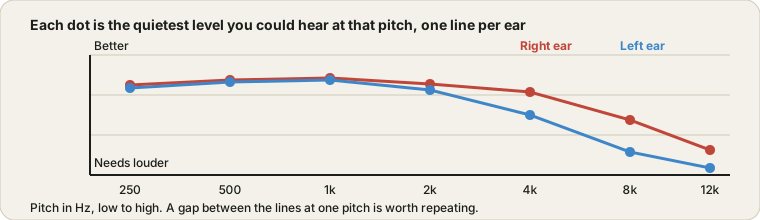
Say you run the hearing check on both ears with headphones. At 1 kHz your right ear hears the tone at -45 dB and your left at -43 dB, which is the same within the error of pressing a button. At 8 kHz your right ear gets it at -38 dB but your left only at -18 dB. The table shows a 20 dB difference at 8 kHz, and the summary says so, because anything of 15 dB or more at one pitch is flagged.
Some arithmetic to put that in perspective. The tone rises about 60 dB over 14 seconds, roughly 4.3 dB a second, so if you pressed half a second late the reading moves by about 2 dB. A 20 dB gap is ten times bigger than that. In amplitude terms, -38 dB is about 1/80 of the loudest tone and -18 dB about 1/8, so the left ear needed the tone about ten times louder.
What to do next. Do not conclude anything yet. Swap the headphones around, so the cup that was on the left is now on the right, and repeat 8 kHz. If the gap moves to the right ear, the headphones are the cause, perhaps a blocked mesh. If it stays with your left ear, repeat on another day, and if it is still there, mention it to a doctor or audiologist. The counter-case: a 5 dB gap at 12 kHz on a single run is just noise in the measurement and not worth acting on.
How to take the hearing test
- Find a quiet place and put headphones on
Close the door, turn off fans and notifications, and wear over-ear or in-ear headphones the right way round, with the left cup on the left ear. Speakers are not suitable for this test.
- Set the volume once with the reference tone
Press the 1 kHz reference tone and set the device volume until it is clearly audible but quiet. Then do not touch the volume again until you are finished.
- Pick a test and press Start
The hearing check goes through seven pitches for each ear. The frequency test plays eight high tones at one fixed volume.
- Press the button the moment you hear it
In the hearing check each tone rises from silence and you press Heard when you first notice it. In the frequency test you answer Heard or Not heard for each tone. If you hear nothing, press Not heard.
- Read the results and repeat once
The chart and table appear as you go. Repeat the same test later and compare. Two runs that agree are worth more than one run on its own.
One run takes up to about three and a half minutes for both ears. Do not rush it and do not take it when your ears are blocked by a cold or just after a loud concert, because the result would describe that moment and not your hearing.
Frequency test: the highest pitch you can hear
The frequency test plays eight tones in turn, 8, 10, 12, 14, 16, 17, 18 and 20 kHz, each for about three seconds. One silent step is mixed in at a random place, which is there to catch guessing: if you press Heard on silence, the page says so and treats your result as rough. A short 1 kHz tone at the start confirms that sound is working.
| Highest tone heard | What it usually means |
|---|---|
| Up to 8 or 10 kHz | Worth repeating with better headphones; many cheap earbuds roll off early, so check the equipment before blaming your ears |
| 12 to 14 kHz | Common in adults, and not unusual from the late thirties onward |
| 15 to 16 kHz | A typical result for many adults in good hearing |
| 17 kHz and above | Seen most often in teenagers and young adults, and still depends on the headphones |
Treat the table as a guide to how people tend to land, not as a verdict. The upper limit changes from person to person, and headphones that cannot play 18 kHz will give the same answer no matter how good your ears are. If you want a sweep with no volume set for you, the Tone Generator has a range finder that glides across the whole range.
Reading your results
| What you see | What it can mean | What to do |
|---|---|---|
| Both lines close together and fairly flat | Your two ears agree | Nothing. Repeat in a few months to compare |
| Both lines rise at 8 and 12 kHz | Ordinary loss of the highest pitches, or headphones that roll off | Try other headphones. If it stays, it is mostly age and past noise exposure |
| One ear 15 dB or more higher at the same pitch | A real difference, or a headphone or fit problem | Swap the headphones, clean them and repeat. If it follows the ear, see a doctor |
| Not heard even at the loudest tone | The pitch is above your range or the headphones cannot play it | Check with the Sound Test that both channels work |
A single odd point on a single run is almost never meaningful. Look for lines that agree across two runs.
What the test cannot tell you
The honest limits are these. The volume is uncalibrated, so a result of -38 dB means 38 dB below this page's loudest tone, not 38 dB hearing level. Headphones do not play all pitches equally well. Room noise and your own heartbeat can mask a quiet tone. And you are pressing a button, so your reaction time and attention show up in the number.
It also cannot tell the cause of anything. Earwax, a cold, noise damage and age all look similar on a chart like this. Please see a doctor or audiologist promptly if one ear drops suddenly, if you have ringing that is new or only in one ear, or if sound in one ear feels muffled or full. Do not wait for a repeat of an online test in that case. A home test is not a replacement for a proper one.
Why high pitches fade first
Inside the cochlea, the hair cells that respond to high pitches sit at the entrance, where every sound has to pass through first. They take the most wear. Age, repeated loud noise and some medicines tend to affect that end first, which is why the upper range shrinks before speech starts to sound unclear. That is also why a person can hear a conversation perfectly and still not hear a 16 kHz tone.
Loud sound is the part you can control. A commonly quoted guideline is that 85 dBA for about eight hours is where risk begins, and every 3 dB above that halves the safe time. In practice, keeping headphone volume at a level where you can still hear someone talking nearby, and giving your ears breaks, helps a lot. To see how loud your own surroundings are, the Mic Test has a live level meter, though it is not a calibrated sound meter.
Headphones, room and volume
Headphones decide as much as your ears do here. A pair that cannot reproduce 12 kHz will fail you at 12 kHz however well you hear. Over-ear headphones seal better than loose earbuds, and a poor seal costs you the lowest pitches. Take the headphones off between ears if you need to adjust them, and make sure the left cup really is on the left ear.
Pick a quiet room and turn off the air conditioner if you can. Use the reference tone to set the device volume once, to a quiet but clear level, and leave it. If you switch to different headphones, set the level again, because the results are only comparable at the same setup. Before you start, a quick pass through the Sound Test confirms that both channels work, and if you suspect a blocked speaker or earbud, the Speaker Cleaner / Water Eject can help.
Where the hearing test comes from
Pure-tone audiometry, the method behind this page, has been the standard clinic test for decades. A device called an audiometer plays single tones at set pitches, one ear at a time, and the person signals when they can just hear them. The results are plotted on a chart called an audiogram, with pitch across and loudness up the side.
A browser can generate the same kind of tone with the Web Audio API, which is why a simplified version can run on any device. What it cannot copy is the calibrated equipment and the quiet booth, and that is the whole difference between a home check and a clinical test.
Frequently asked questions
Is this online hearing test accurate?
It is a useful rough check, not a medical measurement. A clinic uses calibrated headphones in a quiet booth, and your device does not know how loud its own output is. What the page can do reliably is compare your two ears against each other, and compare you today against you next month on the same headphones at the same volume.
What does the frequency test show?
It plays tones from 8 kHz up to 20 kHz at a fixed volume and asks whether you heard each one. The highest tone you hear is a rough measure of your upper hearing range. A silent step is mixed in so you can tell when you are guessing.
What is the highest frequency a person should hear?
Healthy young people often hear up to around 17 or 18 kHz, and some a little beyond. The upper limit slowly drops with age, and many adults stop hearing much above 14 to 16 kHz without any fault. A low ceiling on its own is common and not a reason to worry.
Why do my left and right ears give different results?
Small differences are normal. A gap of 15 dB or more at the same pitch is worth repeating: swap the headphones around, clean them, and run it again. If the gap follows your ear and not the headphones, mention it to a doctor, and do so quickly if it appeared suddenly.
Can I use speakers instead of headphones?
Headphones work much better here. Speakers add room echo and background noise, and the sound from each speaker reaches both ears, so you cannot separate the left from the right. Use over-ear or in-ear headphones and a quiet room.
Why does the tone start so quiet?
In the hearing check each tone rises slowly from almost silent, and you press the button the moment you first hear it. That moment is your threshold at that pitch. The rise is about 4 dB per second, so a half-second delay in pressing adds only a couple of dB.
What should I do before I start?
Sit somewhere quiet, put the headphones on properly, and use the 1 kHz reference tone to set the device volume to a quiet but clear level. Then leave the volume alone for the whole run. Changing it halfway makes the results meaningless.
Is the test safe for my ears?
The page limits its own loudest tone and the tones rise slowly, but the real level depends on your device volume. Keep that volume low and do not turn it up to compensate. If a tone ever feels loud or uncomfortable, press Stop.
Is anything recorded or sent anywhere?
No. The tones are generated in your browser and the page never uses your microphone. Your results stay on the page, and the optional device report keeps only a short summary in this browser.
Fixing common hearing test problems
No sound at all. Check the system volume, the silent switch and that the right output is selected. Press Start again, because some browsers wait for a tap before they play sound. The Sound Test shows whether anything plays.
I cannot hear the first tones, but I hear the loud end. That is how the check works: each tone starts almost silent. Press the button at the first moment you notice it. If you hear nothing before the loudest point, use Not heard.
Results change a lot between runs. Background noise, a different headphone position or a changed volume are the usual causes. Set the volume again with the reference tone and run it in a quieter room.
The test stops when I switch tabs. The page ends the test if the tab goes to the background, because the timing would be wrong. Keep this tab in front for the whole run.
More tools on ProDeviceTest
Checking your audio setup more broadly? These run the same way, in your browser with nothing to install.
- Sound Test — check left and right channels before a hearing test
- Tone Generator — play any frequency or run a sweep to find where a speaker fades out
- Speaker Cleaner / Water Eject — clear water and dust out of a muffled speaker
- Mic Test — see a live level meter for your surroundings
- All Audio Tools — the full category