
Muffled phone speaker after water: what actually helps
Your phone survives a splash or a dip, and then the sound comes out dull, as if someone put a blanket over it. This is common and usually temporary. What you do in the first hour matters a lot, and so does what you avoid doing.
Last updated: · By the ProDeviceTest editorial team
Why the sound goes dull
A phone speaker is a tiny membrane behind a fine mesh. When a drop of water lands on that mesh, it stretches into a film across the little holes, and the membrane can no longer push air through freely. Sound that used to leave easily is now held back, and the high frequencies suffer most, which is why everything seems muffled.
So in most cases the speaker is not broken. It is wet.
The first hour
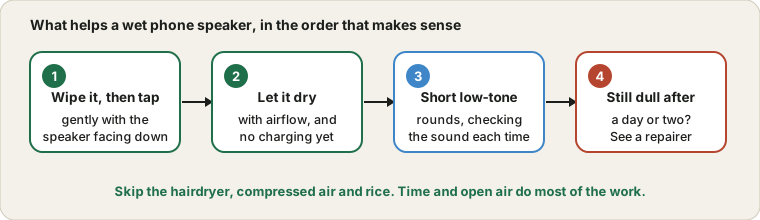
Turn the phone off if it was fully soaked, and wipe the outside with a soft cloth. Hold it with the speaker side facing down and tap it gently against your palm a few times, which lets drops fall out of the openings. Leave it somewhere dry with some airflow.
Then wait before you charge it. A wet charging port is a bigger risk than a dull speaker, and plugging in a cable while there is water in the port can damage the contacts. If your phone shows a moisture warning, take it seriously and wait until it goes away.
Things not to do
- Do not use a hairdryer or heat. Heat can harm the battery and glue.
- Do not blow compressed air into the openings. It can push water deeper or damage the membrane.
- Do not poke the grille with pins or cotton buds. You will break the mesh.
- Do not rely on a bag of rice. It is slow and not better than open air, and the dust can end up in the ports.
- Do not shake the phone hard. A few gentle taps do the job.
Where a water eject sound fits in
A low-frequency tone makes the speaker membrane move back and forth firmly, and that vibration can break up the water film and push the droplets out. That is the whole idea behind the "water eject" features you may have seen on phones and watches. The Speaker Cleaner does the same from the browser.
To use it, put the phone speaker-side down on a soft cloth, turn the volume to a moderate level, and play a round of a minute or so. Check the sound, wipe the grille and repeat if it helps. It makes sense to stop after a few rounds. If nothing changes, the water is not the problem, or it has gone further in than a tone can reach.
Give it time
Even without a tone, most phones recover on their own within a day as the water evaporates. If you can wait, do. Many muffled speakers sound normal again by the next morning, and nothing you do in the first few hours beats simple patience.
Water that is not clean water
Sea water, pool water, soap and sugary drinks are worse than plain water because they leave residue behind. That residue can keep a speaker dull even after everything dries, and salt can slowly corrode contacts. Many manufacturers advise a quick rinse in fresh water for these cases, followed by thorough drying. Check your phone maker's care page for the right method for your model.
When to stop and see a repairer
While the speaker recovers, headphones bypass it entirely, and if one side of those goes quiet, the swap test finds the fault. Water can also upset the screen, so if touches misbehave afterwards, see ghost touches and dead zones. Go for a repair or a warranty check if the sound is still dull after one or two days, if it is crackly or distorted after drying, if the phone shows moisture warnings, or if the battery or screen behave oddly. Also remember that water resistance weakens with age, so a phone that used to survive a swim may be less protected now.
Before you visit, play the Sound Test, so you can tell them whether one channel or both are affected.
Quick questions
Can I use the phone meanwhile?
Yes. Calls normally go through the small earpiece at the top, which is a separate part, and headphones or Bluetooth bypass the speaker entirely. Just avoid charging until the port is dry.
Can a water eject tone harm the speaker?
At a moderate volume for short rounds, no. Do not leave it at full volume for a long time, and stop if you hear rattling or crackling, which suggests something other than water is the problem.
Try it on ProDeviceTest
- Speaker Cleaner / Water Eject — play low tones to help shake water out of the grille
- Sound Test — check that both speaker channels work properly afterwards
- Vibration Test — water can affect other small parts too
More guides: all ProDeviceTest guides