
Headphones working in one ear only? Do the swap test
When one side of your headphones goes quiet, there are only three things that can be at fault: the headphones, the cable or plug, and whatever they are plugged into. You can find out which with a swap test that takes about three minutes and costs nothing.
Last updated: · By the ProDeviceTest editorial team
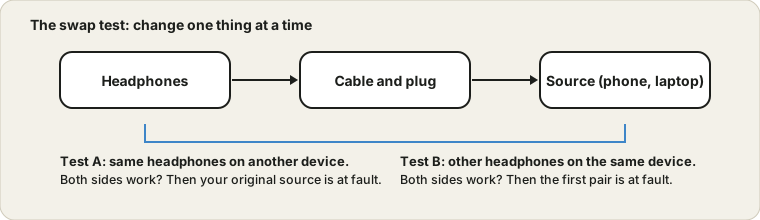
Three suspects
Sound goes from a source, such as a phone, a laptop or a Bluetooth connection, through a cable and plug, into the headphones. If a side is dead, the fault is at one of those places. The trick is to change one thing at a time, so that each test points at only one suspect.
The swap test
- Same headphones, different device.
Plug your headphones into another phone or computer. If both sides work there, the headphones are fine and the original device is the problem.
- Different headphones, same device.
Plug a spare pair into the original device. If both sides work, your device is fine, and the headphones are at fault.
- Still both sides fail?
Then it is likely the headphones, or possibly the cable and plug, and you can go on to wiggle the cable.
For a clear signal use the Sound Test, which plays sound in the left or the right channel separately. It is easier to tell a silent side from a quiet side that way than with music, which may be mixed unevenly on purpose.
The wiggle test for wired headphones
Play a steady tone, for example from the Tone Generator, and gently flex the cable along its length while you listen. Move from the plug upward, then check near the earcups. If the sound crackles or comes and goes at a particular point, the wire is broken inside the insulation there. Cable breaks happen most often right next to the plug and where the cable enters the earcup.
If the plug is worn, tilting it in the socket may bring the sound back for a moment. That is a plug problem rather than a headphone problem, and replacing the cable or the plug fixes it if the cable is detachable.
Lint and dirt in the socket
A pocket collects lint, and it ends up packed into the headphone socket. A plug that cannot go in fully does not connect the left or right contact properly. Shine a light into the socket, and if you see fluff, remove it carefully with a wooden toothpick. Metal can scratch contacts, so avoid pins. The same goes for the plug itself, which can be wiped with a dry cloth.
Settings that quietly cause one-sided sound
If the sound is quiet or dull in both ears rather than missing in one, the muffled speaker guide is a better fit, and a dead headset microphone is covered in the mic guide. Not every case is hardware. Check the balance slider in your sound settings, which may have been moved to one side. Phones and computers also have a mono audio option in the accessibility settings that mixes both channels together, which is useful for some listeners but changes how stereo sounds. If a setting is the cause, the swap test will already have shown the same headphones working properly on another device.
Bluetooth earbuds
With true wireless earbuds the left and right buds talk to each other, so one silent bud is often a pairing problem rather than damage. Put both buds in the charging case, check that both charge, and clean the little metal contacts on the buds and in the case. Then remove the earbuds from your phone's Bluetooth list and pair them again. Most makers also describe a reset procedure for the earbuds, which is worth a try before you give up on a pair.
Repair or replace?
A cable break in a pair with a detachable cable is a cheap fix. For sealed headphones, soldering a new cable is possible but fiddly, and cheap earbuds are rarely worth the time. If the headphones are expensive and still under warranty, claim it. Keep your swap test results handy, because they show the fault is in the headphones and not in your device.
Quick questions
Why is one side quieter instead of silent?
A partly broken wire, dirt in the plug, a balance setting or an uneven mix in the track can all do it. A steady test tone removes the track from the equation.
Is it safe to wiggle the cable while testing?
Yes, but keep the volume low. A bad connection can crackle suddenly, and that is unpleasant at high volume.
Try it on ProDeviceTest
- Sound Test — play a tone in the left or right channel to see which side works
- Tone Generator — a steady tone helps when you wiggle a cable and listen
- Speaker Cleaner / Water Eject — for a muffled speaker rather than a silent one
More guides: all ProDeviceTest guides