
Controller stick drift: how to confirm it and what to do
Your character slowly walks off to the left while you are not touching anything, or the camera keeps creeping. That is stick drift, and it affects almost every kind of controller at some point. Before you spend money, it is worth confirming that it really is drift and not something else.
Last updated: · By the ProDeviceTest editorial team
What drift is, in plain words
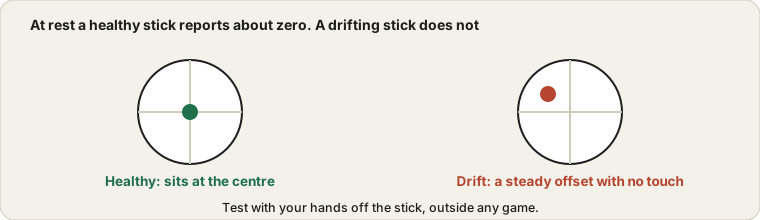
A thumbstick measures how far you push it. At rest it should report zero, meaning centred. Drift happens when the stick reports a small push even though your thumb is nowhere near it, so the game reacts as if you were moving. The usual reasons are wear inside the stick, dust and grime, or a stick that no longer returns exactly to the middle.
Check that it really is drift
Games add their own settings, such as dead zones that ignore small movements, and some have poor defaults. A game that shows odd behaviour while another game is fine may just have an unlucky setting. So test outside any game.
Open the Controller Test with the controller connected, and put it down on a table without touching the sticks. Watch the stick values. A healthy stick sits very close to zero on both axes and stays there. A drifting stick shows a steady offset, or the values slowly creep. Also push the stick in a full circle and see whether the movement looks smooth, because a worn stick may show jumps or a flat edge.
Quick things to try first
- Charge or replace the batteries. A low battery causes strange readings on some controllers.
- Restart and reconnect. Reset the pairing, or use a cable to rule out a wireless problem.
- Recalibrate. On Windows, search for "Set up USB game controllers", open the controller's properties and use the calibrate option. Consoles and game stores such as Steam have calibration or dead zone settings too.
- Raise the dead zone. In the game or system settings, a larger dead zone can hide mild drift. It is a stopgap, because it makes small movements less precise.
Cleaning the stick
Dust and sticky residue around the base of the stick are a common cause. Blow short bursts of air around the stick base while you rotate the stick. If that does not help, a cotton swab with a small amount of isopropyl alcohol, rubbed gently around the base while you rotate the stick, can clear stubborn grime. Use very little liquid, let it dry fully before you use the controller, and keep the alcohol away from the buttons and the casing. If this feels like too much, skip it, since opening or soaking a controller can make things worse.
Warranty, repair or replace
Check the warranty first. Many makers cover drift within a certain period, and some have repair programmes. If you are out of warranty, you have two real options. You can replace the stick module, which is a repair many people do themselves with a small screwdriver set and a cheap part, or you can buy a new controller. For a pricey controller, the module is often the better value. For a cheap one, a new controller costs about the same.
If you buy again
Some newer controllers use a different type of sensor in the sticks, often called Hall effect, which measures position with magnets instead of a rubbing contact. Since nothing rubs, there is much less to wear out, so drift is less likely over time. They are not magic and the claim should be checked against reviews of the model you want, but if drift has bitten you twice, they are worth a look.
Making the next one last
You will never eliminate wear, but you can slow it. Do not leave the controller where it collects dust, and avoid pushing the sticks harder than you need to. Store it away from sticky surfaces. And run a quick resting check now and then. Catching drift early gives you more options, including a warranty claim.
Quick questions
Can drift fix itself?
Sometimes it eases after a clean or a recalibration, but if the offset returns within days, wear inside the stick is the more likely cause.
Does a larger dead zone hurt my aim?
It ignores tiny movements, and in fast games that can feel like a loss of precision. Keep it as small as you can while the drift stays hidden.
Can I check a second-hand controller before buying?
Yes, and the used device checklist is a handy companion for the other parts. Connect it, open the controller test and look at the resting values. It takes a minute and tells you more than the seller can.
Try it on ProDeviceTest
- Controller Test — see every button and stick position live and measure the resting value
- Mouse Test — if you also suspect your mouse, test it the same way
- Keyboard Test — useful when you play with keys and want to rule them out
More guides: all ProDeviceTest guides