
Headphones too quiet? Volume lives in more than one place
Full volume, and you still strain to hear. Before blaming the headphones, remember that sound passes several volume controls on the way to your ears, and any one of them can be sitting low. Check them in order and you will usually find it.
Last updated: · By the ProDeviceTest editorial team
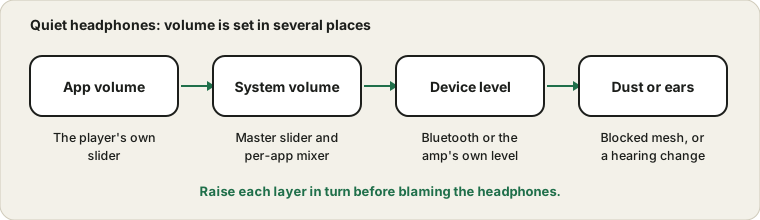
The volume stack
A song is quiet in your ears for one of four reasons, and the first three are settings. The app has its own slider. The operating system has a master volume and often a per-app mixer. The headphones or amplifier have a level of their own. The last place is the physical part, which means dirt in the mesh or a change in your hearing.
Start at the app and walk toward your ears. A video at 100 percent in a system whose master is at 30 percent is still quiet.
The per-app mixer
Windows has a volume mixer that lets each app have its own level, and an app you muted or turned down once can stay low for months. Open it and check the app you are using. Microsoft's guide to fixing low or quiet sound in Windows also lists loudness options in the device properties, which can raise the apparent level on weak outputs.
Two levels for Bluetooth
Bluetooth headphones may keep their own volume separate from the phone or computer, and some pairings do not keep them in sync. If the headphones have a volume control, raise it as well as the system volume. Then test with a different device. If they are loud on the phone and quiet on the computer, the computer's setting is the problem, not the headphones.
Clean the mesh
Earwax and dust build up in earbud mesh and over time block part of the sound. Gently brush the opening with a dry soft brush, or use the cleaning method in the maker's guide. Do not push a pin into it, and avoid liquids. Replace silicone tips if they are stiff or loose.
Compare with a reference
Play the Tone Generator at a low level through the headphones and then through speakers or a second pair of headphones. If only one pair is quiet, the problem is the pair. If every output is quiet, look at the software or at your hearing. A Hearing Test can show whether certain pitches are harder to hear, but it is not a medical test, so see a professional if you notice a change.
Volume limits and safe listening
Some phones and regions limit maximum headphone volume, and some devices warn when you listen loudly for a long time. If the volume is low because of a limit, raising it is a personal decision, and listening at high levels for hours can damage hearing. If sound is crackly rather than quiet, see the crackling guide; for one silent side, this guide.
Sources and scope
These are general checks for low volume. The tests here are not a hearing assessment, and anyone who notices a change in their hearing should see a qualified professional.
Official documentation used for this guide:
Try it on ProDeviceTest
- Sound Test — compare left and right and judge the level with a known sound
- Hearing Test — see whether the quietness depends on pitch
- Tone Generator — a steady reference tone at a known frequency
More guides: all ProDeviceTest guides