
Bluetooth audio delay: why the sound arrives late
Voices lag behind lips in a video, or a game's gunshot lands after the flash. Wireless headphones add a delay, and it is not a fault in yours. Knowing where it comes from tells you what can be improved and what cannot.
Last updated: · By the ProDeviceTest editorial team
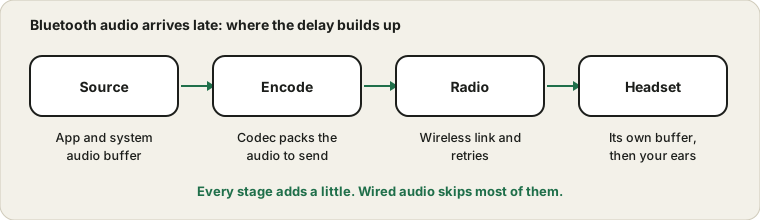
Where the delay comes from
Sound has to be buffered by the app and system, compressed by a codec, sent over a radio link that sometimes has to resend, and buffered again in the headphones before it plays. Each stage adds a little. Together that is noticeable, often a few tenths of a second on common setups. Wired headphones skip most of that, which is why they feel instant.
Why video usually looks fine
Video players know about the delay and hold the picture back to match, so most films look in sync. Games, live calls and some music apps cannot hold anything back, because you act and expect an immediate sound. That is why a lag feels worse in a rhythm game than in a streaming film.
Measure it by ear
Put on the headphones and start the Metronome, then compare it with the same click through the computer speakers or a wired pair. The gap you hear between them is the delay. Do the same with your game or video app. If the metronome seems fine but one app is late, that app has its own audio setting or buffer to change.
What reduces it
- Use a cable when timing matters.
A wired headset or USB audio avoids the wireless stages.
- Look for a low-latency or game mode.
Some headsets and transmitters offer one, and it helps only when both ends support it.
- Reduce interference.
Keep the headset close, away from crowded wireless gear, and re-pair if the link keeps retrying.
- Update the firmware and drivers.
Fixes sometimes cut delay or dropouts. Check the maker's support pages.
Delay is not dropouts
A steady lag is different from audio that skips or crackles. Skips point at a weak link or interference, and Apple's support page about wireless headphones that cut out or distort covers that. Crackle on any connection is dealt with in the crackling guide.
Delay on calls
On a call the delay stacks with network delay, and the microphone side often switches the headset into a lower quality mode, as explained in the Bluetooth mic quality guide. For important calls, a wired headset removes a whole category of problems.
Sources and scope
Delay depends on the headset, device, codec and app, so the numbers vary. Listening comparisons are rough and not a lab measurement, and a low-latency mode only works if both devices support it.
Official documentation used for this guide:
Try it on ProDeviceTest
- Sound Test — play a known sound and compare wired and wireless
- Tone Generator — a clean reference for comparing outputs
- Metronome — a steady click that makes delay easy to hear
More guides: all ProDeviceTest guides