
Mouse double-clicking when you click once: setting or worn switch?
Files open when you wanted to select them, a drag drops early, and a single click in a game fires twice. It feels like a software bug, but this is one of the few computer faults where the cause is usually a small piece of metal inside the mouse.
Last updated: · By the ProDeviceTest editorial team
Count the clicks first
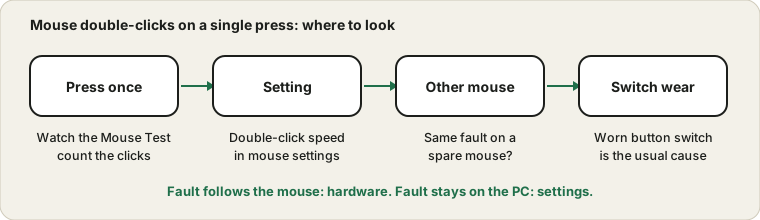
Before changing anything, get a clear picture. Open the Mouse Test and press the left button once, slowly, ten times. Each press should light up or count exactly once. If some presses register twice, you have reproduced the fault, and you now have something to measure a fix against.
Note which buttons do it. A double click on the left button alone points at that one switch. If every button does it, look at settings, the cable and the receiver instead.
Why the switch is the usual culprit
Under each main button sits a tiny mechanical switch. A press bends a metal contact, and the contact is supposed to touch once, cleanly. With age the contact surface wears and the touch becomes ragged for a few thousandths of a second, so the computer sees two presses. People call it chattering. Left buttons wear first because they get pressed far more than any others.
That is why the fault tends to start as an occasional double click, then get more frequent. It rarely cures itself.
Rule out the settings
Open Windows mouse settings and look at the double-click speed slider. It decides how long a gap still counts as a double click. If it is set to the extreme, two separate presses can be treated as one action, which can feel like a fault. Move it to the middle and test again. Microsoft's mouse settings and troubleshooting pages describe where it lives.
Also check whether sticky or filter-type accessibility features are on, since those change how repeated presses are handled. Turn them off and repeat the count.
Borrow a second mouse
This is the fastest way to separate hardware from software. Plug in any other mouse, even a cheap one, and repeat the ten-click test. If the fault disappears, it was your mouse. If it follows to the new one, the cause is on the computer, and you should look at the settings, drivers or a utility that remaps buttons.
For a wireless mouse, also try a fresh battery and a different USB port, because a weak link can duplicate signals.
Repair, or replace?
Some people open the mouse and replace the switch, and some are happy to try cleaning it. For a mouse that costs very little, replacing it is the sensible choice. For an expensive one, check the warranty first, because switch wear is often covered within the first couple of years, and opening the case may void it. Do not spray liquids into a switch.
If the keyboard has a similar problem with repeating letters, the keyboard keys guide covers it.
When it is not the clicks at all
A slow monitor or a lagging page can make one click look like two, and an app that treats press and release as separate events can too. If the Mouse Test shows exactly one click per press, but one app misbehaves, the fault belongs to that app. If the pointer itself jumps, that is a different symptom with its own guide: jumpy mouse cursor.
Sources and scope
Menu names follow current Windows and can differ on older versions. A click counter shows what the computer receives; it cannot see inside the switch, so a worn switch is the most likely, not a proven, cause.
Official documentation used for this guide:
Try it on ProDeviceTest
- Mouse Test — count clicks on every button and watch for doubles
- Keyboard Test — the same idea for keys that repeat
- Refresh Rate Test — rules out a laggy screen that only looks like a double click
More guides: all ProDeviceTest guides