
On this page
Printer streaks, lines or faded colour: what the page is telling you
When a print goes wrong, the instinct is to buy new ink. Sometimes that is right, but often the cartridge is fine and the problem is a blocked nozzle, a dirty roller or a setting. A single test print usually says which, and that can save you a lot of ink and a few pointless trips to the shop.
Last updated: · By the ProDeviceTest editorial team
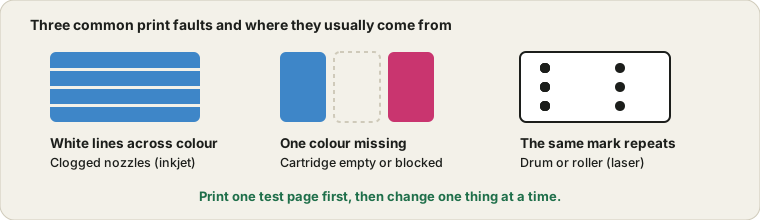
Print one test page before you change anything
Guessing is expensive. Print the Printer Test Page on plain paper and keep it beside you. Solid blocks show missing colour and banding, thin lines show alignment, and the grey ramp shows whether the shades step smoothly. In the print dialog, switch on background graphics, or the colour blocks may not appear at all and you will chase a problem that is only a setting.
Symptom, likely cause, what to do
This table covers the most common cases. Treat it as a first guess, not a verdict.
| What you see | Likely cause | First move |
|---|---|---|
| Thin white lines across a colour block (inkjet) | Clogged nozzles in the print head | Run one head cleaning, then reprint |
| One colour missing or weak | That cartridge is low, or only that nozzle row is blocked | Check ink levels, then clean once |
| Everything slightly faded | Low ink, draft mode or the wrong paper type | Check quality and paper settings |
| Straight black or grey streak down the page (laser) | Dirty or worn drum or toner problem | Check the toner and drum, clean as the manual says |
| The same mark every few centimetres (laser) | Damaged roller or drum | Measure the spacing, then look up your model |
| Double or blurry edges on text | Misaligned heads or the wrong paper | Run the alignment routine |
| Smudges that wipe off | Paper too glossy or too damp, or ink not dry | Use the right paper and let the page dry |
How many cleaning cycles are worth it
A head cleaning pushes ink through the nozzles to clear them. It works, but it also uses ink, and some of that ends up in a waste pad inside the printer. So cleaning ten times in a row is not diligence, it is waste.
A sensible routine is one cleaning, a test page, and if there is partial improvement, a second cleaning. If you see no change after two rounds, stop and let the printer rest for a few hours before trying once more. Sitting idle lets the solvent in the ink soften the dried deposits, and that works better than another burst of ink.
Why a printer that sits unused gets worse
Inkjet ink dries in the nozzles when nobody uses the printer. That is why a machine used once a month may print worse than one used every week. A small test print every week or two keeps the nozzles moving. Turn the printer off with its own power button rather than at the wall socket, because the proper shutdown caps the head and protects it from air.
Cartridges: original, compatible and refilled
Original cartridges are the safest and the most expensive. Compatible and refilled ones can work well, but quality varies, and some printers reject chips they do not recognise. If streaks started right after you changed brands, try swapping the original back in before assuming the printer is at fault. And remember that a low-ink warning is an estimate, and the cartridge often still has something left in it.
If it is a laser printer
Laser problems look different from inkjet ones. Streaks and repeating marks usually come from the drum, the toner or the fuser, and they follow a pattern that the printer repeats exactly. Measure the distance between repeated marks, because manufacturers often publish a table that links that distance to a specific part. Replacing a drum or toner is generally simpler than anything an inkjet needs, but it is not free, so identify the part first.
When to stop and call it
If you are buying a used printer, a test page is the first thing to print, in the same spirit as the used device checklist for phones and laptops. Weigh the cost. If a new print head or a service visit costs close to a new printer, replacing the whole machine may be the better deal, especially for a cheap home inkjet. If the printer is under warranty, contact the maker before you try anything more drastic. Whatever you decide, keep the test page. It is a good thing to show support, because it is clearer than any description.
Quick questions
Can I clean the print head by hand?
Only if your manual describes it. On many printers the head is built into the cartridge and is best left alone. Where a wipe is allowed, the usual advice is a lint-free cloth and a little distilled water, never a rough tissue.
Why do colours look different on paper than on my screen?
A screen makes its own light and paper only reflects it, so the two never match exactly. Slightly darker, less vivid prints are normal. A big colour shift in one direction, say everything too green, is the kind of thing a test page makes obvious.
Try it on ProDeviceTest
- Printer Test Page — print colour blocks, fine lines and a grey ramp on A4 or Letter
- Dead Pixel Test — for the screen, when the printout looks fine but the display does not
- All Device Tests — other checks for your desk
More guides: all ProDeviceTest guides