
How to test your iPhone microphone
An iPhone does not have one microphone. It has several, and which one you hear depends on what you are doing. That is why people say "my mic works in Voice Memos but not in my call". Both can be true, and both have different fixes.
Last updated: · By the ProDeviceTest editorial team
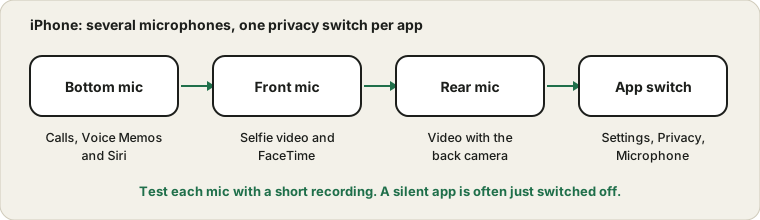
Several microphones, several jobs
Modern iPhones use different microphones depending on the task. The one near the charging port handles normal calls and Voice Memos. Others sit near the front camera and the rear cameras, and are used for video. Apple's own troubleshooting page for iPhone microphones makes the same point and suggests testing each one separately with a recording.
So test like this: record a Voice Memo, then a short video with the front camera, then a short video with the rear camera. Play each back with the volume up. Whichever clip is quiet or missing tells you which microphone, or which hole, has the problem.
The per-app switch
Open Settings, then Privacy and Security, then Microphone. Every app that has asked to listen has its own toggle. If you tapped Don't Allow when a call app asked the first time, it will stay silent until you switch it on here. It is the most common reason for a mic that works everywhere except one app.
While an app is using the microphone, a small orange dot appears at the top of the screen. If you expect your call app to be listening and there is no dot, the app has not got the microphone, and the permission is the place to look.
Case, protector and pocket lint
The openings are tiny. A thick case that misaligns with the bottom holes, a screen protector that covers the earpiece mic, or a layer of pocket lint can all muffle your voice. Take the case off, look at the holes with a torch, and clean them gently with a soft dry brush. Do not push a pin or a needle in; you can damage the part you are trying to rescue. Apple's care guidance is clear that sharp objects do not belong there.
Mic Mode and Voice Isolation
While you are in a call, open Control Center and tap Mic Mode. On supported apps you can choose Standard, Voice Isolation or Wide Spectrum. If people say you sound muffled in a noisy place, Voice Isolation is the one to try. If someone is hearing you sound strangely flat while you play an instrument or sing, try Wide Spectrum. The option only shows during a call or recording in an app that supports it.
When earbuds are quietly in charge
If a Bluetooth headset or car system is connected, the iPhone may be using its microphone instead of its own. Swap the earbuds back into their case or switch Bluetooth off for a moment and test again. If the problem disappears, the headset was the one answering. The wider story is in why Bluetooth headset mics sound worse.
If it is still wrong
Restart the phone and update iOS, because small bugs do get fixed that way. If even Voice Memos is silent in every test, with no case, no Bluetooth and a clean opening, the hardware may need a look. Apple's liquid-damage policy is relevant if the phone has been wet; our guide to a muffled speaker after water explains what to do in the first hours. Android user? See the Android version.
Sources and scope
These checks cover the common causes. They cannot diagnose a hardware fault or water damage, and the exact Settings layout can change with iOS updates.
Official documentation used for this guide:
Try it on ProDeviceTest
- Mic Test — open it in Safari to check the microphone the browser can use
- Sound Test — check the speaker side of calls
- Muffled speaker after water — if sound problems began after a splash
More guides: all ProDeviceTest guides